Role: Design Engineer, UX Designer, AI Agentic Engineer (Vibe-coder), UX Researcher
Client: The Bored Gamers
Key Outcomes: Designed and shipped bored game night organizer & sign-up website
Tools: Bolt.new, Claude
Project Length: 2 days
Project’s Team: 1 other AI Agentic Engineer
Bored game group needs a web method (desktop & mobile) to organize games to replace their current whiteboard sign-up method and notify players and of games. Game nights consist of 50-60 people of 10-12 players per game with each game needing 1 storyteller (ST) and each game is located in different locations.
Storytellers can create, host, and edit games. Players can sign up for games.
Storytellers & players are provided basic game information (time, location, storyteller, player count, etc…)
Changes and builds had to be below bolt.new's free daily AI token limit (approx. 5-15 prompts), so focus more on usability than UI.
Timeline: Had to finish prototype within 2 days before bored game night where the MVP will be used for the first time.
My team member used AI to agentic code the core foundation of the app. Afterwards, I performed a UX audit and I agentic coded bug fixes and UX improvements.
Perform UX audit on beta version of app and list issues or areas of improvement.
Prioritize fixes due to daily token limit and timeline.
Use Claude to iterate & refine agentic-engineer prompts for bolt.new for front-end and back-end development due to Claude better understanding how best to word prompts for AI for efficient use of daily tokens.
Run prompts in bolt.new & iterate as needed
Publish/ push changes to live app
Create usability test survey with help of Claude & send to app users for feedback
Through my UX audit, I saw that Version 0 had a P0 bug of games inaccurately counting players by including the storyteller (ST) in the player count, so games will have 1 less player than the maximum player setting and the app will label it as a full game.
Games were labeled a binary of "Open" or "Full" to represent games that were open to new players or a game that is full.
Problem creates confusion, time wasted, and missed opportunity. Affects ST's as different player counts leads to different game setups. Affects players as 1 less person will be able to join a game.
While not an important issue, "Open" or "Full" is an adequate label, but users want to know how many open spots are left as players usually want to play with their friends and sign up together or players are usually shuffled between games due to skill level.
Update back-end logic of counting players to not include ST. And create logic to replace "Open" game card labels to "X open spots" where X is a number. New card label will indicate open game in addition to providing informative knowledge that a person will not have to calculate. Removed initial circles next to name on player list and replaced with numbers next to players (not including ST)

Leo is a ST, but is included in the player count, which should read 6 players

Previous game menu screen had game cards that were "Open", but mental math to figure out how many spots were left

With a "# of spots open", users can more easily understand and coordinate games with friends or ST's can more easily shift players

1 ST & 6 players incorrectly counted as 7 players and the upper right shows an "Open" game label that may be confusing for the general user

1 ST & 6 players correctly counted as 6 players and the "Open" label is replaced with double the information that it is an open game with 6 spots left
For destructive actions, such as deleting games, players from games, or leaving games, there is currently not a recovery path. For deleting games, there is a confirmation modal to confirm ST wants to delete game.
In general, deletion of games, players from games, or a player leaving a game is a high-consequence action. As games are recorded for each players' game stats or players want to play in certain games and spots fill up quickly.
Create temporary toast notifications with an Undo button where clicking it can reverse the action and restore the item exactly as it was, which requires a soft-deletion on the front-end/ UI. The toast lasts for 8 seconds and when it passes or when the user navigates away to another screen, items are permanently deleted.

Previous toast when removing a player from a game
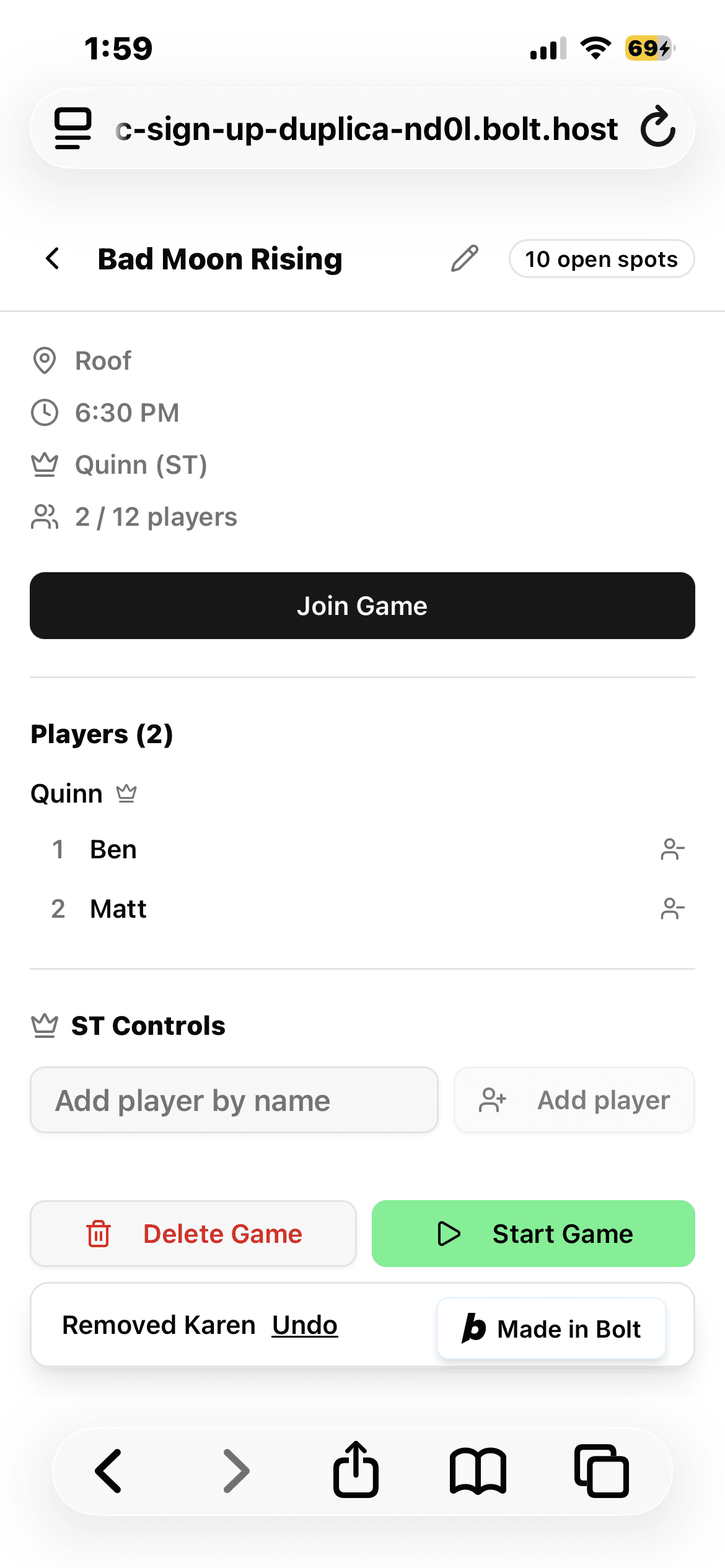
Removing a player from a game now has an "Undo" button in the toast to reverse action
ST's have to manually type in the time for desktop each time. When creating a game, a time needs to be set to communicate what time a game will start.
New games usually start right when a game ends, so the new game time is predictable as the present moment. This is recognized as a repeated action to create games and set the time to the present moment. And 1 of the goals of the app is to make things more seamless and lessen turnover time between games.
Due to limited daily tokens, the start time field overlaps with "Max players" field and was not fixed to be responsive. However, I felt it was a good trade-off of having a useful button to better the ST's user journey.
Create new "Set start time to now" button underneath the time field, so users can use it as a quick action, reduce keystrokes, and create more friction-less experience quicker.

Prior "Create Game" pop-up screen

Creation of "Set start time to now" underneath start time field
"Create game", which is a floating action button with a plus sign, is partially covered by bolt advertisement due to app being hosted on the free version of bolt.
Confusion during ST's first time using the app. After the first time, there is a potential chance of frustration each time an ST wants to create a new game as there is a chance of misclicking and being led to a new window of the bolt website.
Create new "Create game" button with plus icon beneath the open games, so it will no longer be partially obstructed by advertisement and there is proximity to the open games and along with the CTA being a slightly different color, the user's eye will naturally be drawn to it. Limitation is not enough tokens to make CTA button more prominent.

Create game floating action button is partially covered by Bolt advertisement placement


50+ users on MVP
90% of usability test participants reported ease of use
4.75 minutes/game on average was saved by using the app vs. old white board method. With an average of 6 games/game night, that is saving a total average of 28.5 minutes/game night.
This was a new experience and allowed me to combine my different knowledge bases in real-life application of UX & UI design principles, agentic-engineering (vibe coding), and computer science knowledge of back-end logic.
This was my first time using an AI development platform and there was a learning curve in terms of how to prompt or translate what you want to do into a prompt. In general, this was also a fun project and I will be agentic-engineering/ vibe-coding more in the future.