Designing from 0: Using AI to design AI voice-assisted idea organizer mobile app (Case study is work in progress)


Project Overview
Role: Product Designer/ UX Designer
Project Background: Designed during 2026 Protothon's timeline, but did not follow design-a-thon's prompts and used it as a personal design challenge
Key Outcomes: Designed home screen widget, AI voice assistant screen, and other mobile screens
Tools: Figma, Claude design, Paper.design
Project Length: 1.5 days
Part 0: Exploration/ Discovery
Problem
Ideas come to me as I am about to fall asleep, but I don't want to look at a bright screen or turn on a light to write it down as the light will disrupt my ability to sleep.
The Notes app feels like a black-hole. When I am out and about, I will jot down ideas in my notes app, but I don't revisit them and they sit in my notes app.
Brainstorming an idea app
I wanted to build an app that could help me log an idea quickly, resurfacing old ideas, building on top of, grouping ideas together, and being able to extract ideas and put them into AI for further development or help flesh out ideas and bring them into fruition.

App icon including logo, an "i" that looks like a candle, which stands for the name "Ideate" and to symbolize when inspiration hits
Part 1: Brainstorm Functionalities
Log ideas when inspiration hits
The app should capture ideas when inspiration hits, so in the homescreen widget, I added a way to record ideas in various mediums - by typing, drawing, image or video, audio recording, or using an AI voice-assistant.
Surface ideas like flashcards
To make sure items do not go forgotten, I brainstormed a widget on the home screen that will show a new idea every 1 hour. And users will be reminded of the idea to marinate in it or can comment on it if they think of something new that they can add to it.
Organize & prompt ideas into AI
I wanted to emulate organizing ideas like real life white boards, bulletin boards, and post it's where you can move ideas, connect them, and group them together.
And give the users to build on top of their ideas by using AI for further insights by using an AI API.
Part 2: Prompting AI for wireframes
Aspects inspired by Claude Design & Paper.design (OpenAI)
Claude: In terms of widget, I liked the logo from Claude and wanted to iterate on it & the color orange as it is eye-catching as a CTA and ties to the idea of sparky inspiration. I also liked how Claude displayed what type of medium the idea came from, which idea board the idea belongs to, and the buttons located at the bottom.
Paper.design (OpenAI): Compared to the font used in Claude, a sans-serif font will be easier for readability.

Widget from Claude Design
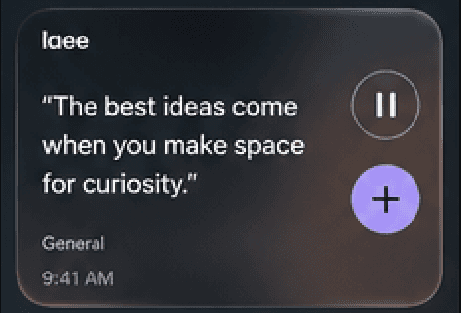
Widget from Paper.design & OpenAI's API
Part 3: Creating hi-fi frames
Testing out different button-placement ideas
Left: More compact design with smaller CTA. A thought was that the user may have other widgets on their homescreen, so a larger CTA may take up more real estate than desired by the user.
Right: Larger CTA will allow user to quickly log their idea when an idea comes to mind. I also added which type of medium the idea was recorded, which may help jog user memories of when they first logged the idea to put their mind in their prior headspace.

Widget from Claude Design

Widget from Paper.design & OpenAI's API
Part 4: Boards & how to organize ideas
Boards
There would be a general board (like white board) where all ideas live, but users can create more niche boards for themes of their choosing or different aspects of their life.

Boards menu

User created board for poems